Preparation
Import the Inferno tile pack below in RuneLite (Ground Markers → Import Ground Markers). It includes Zuk safespots, unsafe attacking tiles at Zuk, the bat safespot at the north pillar, the central nibbler spawn, and the Triple Jads starting tile.
How these links are built, and how to make one for any other content, is in Sharing RuneLite Tile Markers.
Tile Markers
North pillar tiles and breakdown
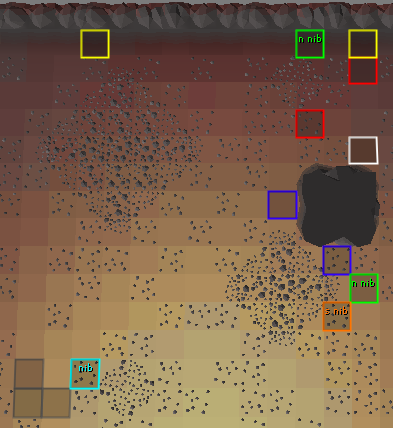
- Green = Useful nibbler "safespots"
- Orange = South pillar nibbler safespot for meleers
- Red = common melee corner traps
- Blue = melee safespots
- White = corner trap tile for later waves/east melee
- Bottom left cyan tile = central nibbler spawn
While tile markers are handy, they can be counterproductive in excess, so try to mark reasonably. If you mark a tile, ensure you have its function memorised.
Starting Tiles
xZact tile: 2 south of bat safespot
- Start on this tile for low waves: 1 through 49.
- Gives good access to nibblers while being exposed to relatively few spawns on wave start.
Kelvino tile: 1 east of bat safespot
- Start on this tile for complicated waves, such as 31, 48, and always for waves 50+.
- Exposed to fewest spawns on wave start, as a tradeoff for having less access to nibblers. You will get dragged out if nibblers go south.
- Any combination of a mager or ranger north + a melee north (W/NW/NE) will automatically be offticked if you stand still on the column kelvino tile is on (be aware a SW mage can see you on Kelvino tile if south pillar is still alive, so take a step south if so).
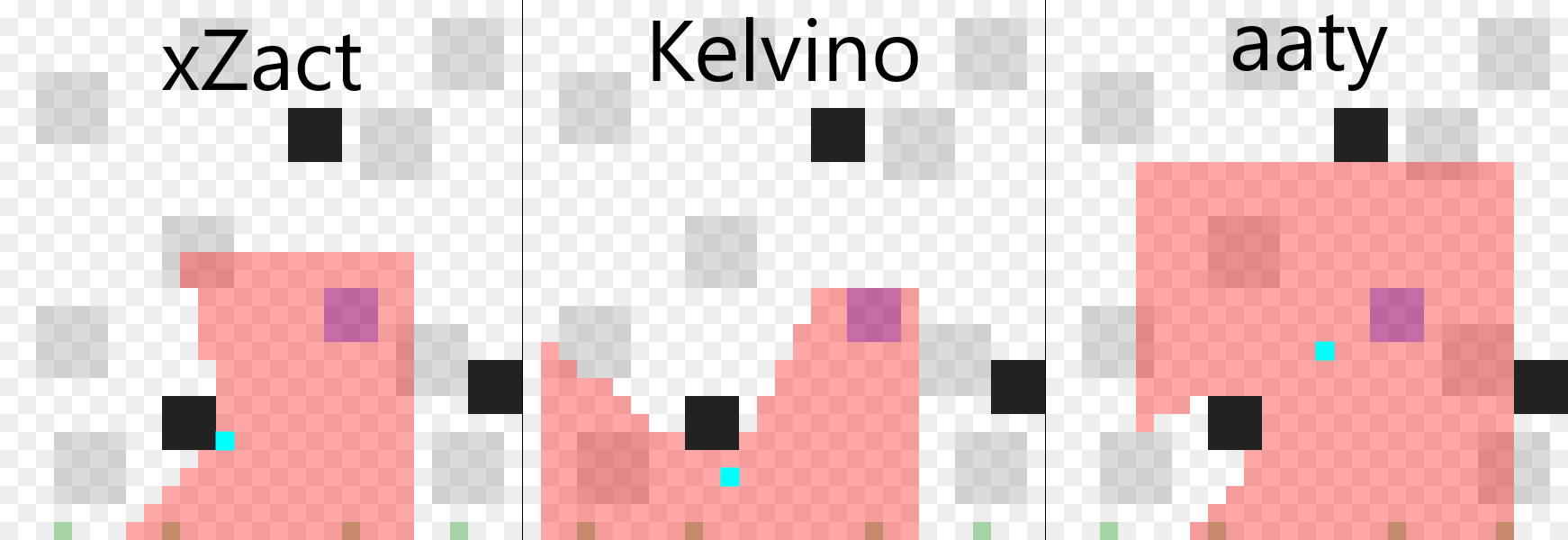
Credits to Mousecream
Useful Plugins and Settings
Remember that none of these are mandatory to beat Zuk, so use what feels most comfortable.
-
Ground Markers
Import the Inferno tiles link from the Preparation section above.
-
NPC Indicators
Tick "Highlight true tile" option, add "Jal*" and "Yt*" to NPC list -
Jal*, Yt*, -
Metronome
Set tick count to 1. Helps you get familiar and comfortable on tick timing when starting out. Visual Metronome can also be used but relies on you needing to pay attention to it on screen whilst solving waves.
-
Entity Hider
Tick "Hide Dead NPCs" option, this will remove the death animation of monsters.
-
GPU
Increases render distance to enable you to see spawns to the south of the arena.
-
Anti Drag
Set Drag Delay to 10, untick "On Shift Only". This prevents you dragging your gear when switching, ensuring your inventory stays organised. Increasing the number makes intentionally moving items more difficult.
-
Inferno Stats
Select "Line Of Sight" as the preferred Wave Tool setting. Saves the wave spawns with a link to the LoS tool, allowing you to review and share spawns quickly.
-
Mute the In-game Area Sounds
Muting Area Sounds removes the sound of Zuk attacking the shield as well as Zuk healers which can be distracting for some, some may also choose to mute the in-game music.
-
Low Detail
Removes unnecessary textures.
LoS Tool
How to use Inferno LoS Tool: https://ifreedive-osrs.github.io/
- Grey tiles: Possible spawn locations
- Black tiles: Pillars
- Blue tile: Player (you have to manually move around)
Red boxes around NPCs/Player are the range of monsters. Player default range is 10, which is Tbow/barrage range.
- Select NPCs and place them.
- Use arrow key up+down or scroll wheel to see which ticks each npc attacks and if they are offticked.
- In the left panel, Red is mage, Green is range, and each row constitutes a tick.
- Yellow/blue are blob scans and black is blob attack.
Credits to ifreedive for making the tool and Homer for writing its guide
Inferno Simulator
Practice on Scim. That link, starting at wave 38, is the simulator this guide recommends. Change the wave number in the URL when you want a different start.
What people are saying about Scim
Scim.gg is an unofficial combat simulator. It does not log into Old School RuneScape. Discussion through late 2026, mostly on Reddit, is where people are sending learners.
Players who used Inferno Trainer and then moved to Scim say the older sim's timing is slightly off, and that its gear is years out of date, so the clicks you drill there do not match a current setup. October 2026 cape posts recommend Scim for Zuk. One player switched from Inferno Trainer, practiced Zuk on Scim, and cleared on their second real Zuk. Others call the Zuk sim the one to use, and say a few sessions there, then logging out at Zuk in the real run, was enough to get the kill. Mobile players have been the loudest: the same site is one of the first Zuk, Sol Heredit, and Radiant Oathplate practices that runs on a phone. Comments there describe it as close to the live fight, and sometimes smoother or more responsive than the client.
The complaints are about getting it to run. On some phones the fight never loads: a black screen, or a message that loading the UI failed. An Android tablet worked for at least one person whose iPhone did not. The sim needs WebGL2, so a browser with hardware acceleration off, or an extension blocking WebGL, stops at the interface. A few comments treat any new combat site as a scam or a virus risk. Scim's own disclaimer says it is not a game client, does not connect to the game servers, and the only account data it reads is a public hiscores lookup if you ask the loadout planner for your levels. That same disclaimer says timings, damage, and mechanics can differ from the live game, and a game update can make the sim wrong without the site changing.
October threads were about the main site, which people were using for Zuk, Sol, and Yama. Those posts still said you needed the older Inferno sim for triple Jads and earlier waves. An August thread asked whether Yama contracts and the Oathplate acquisition fight were coming, and some replies were that Yama does not need a sim because you can just go kill it. The wider argument is the same one people have had about Inferno Trainer and the Colosseum sims: a lot of players say the sim takes the nerves out of the first real Zuk, and a few say dying to Zuk live is part of earning the cape. The players posting clears treat the sim as practice, then still send the real waves.